Installation
XSLOPE can be installed from PyPI (with pip) or from conda-forge (with conda). You can
also install directly from the source repository.
Prefer not to install anything?
You can run XSLOPE entirely in your browser with no local installation using the pre-configured Google Colab notebooks. See Colab Notebooks for details.
Want the graphical desktop app?
The XSlope Studio desktop application installs with the
gui extra (pip install "xslope[gui]"). See
XSlope Studio → Installation for the extras
(gui, fem, ai) and launch instructions.
Installing with pip
XSLOPE is available on PyPI. If you intend to only run limit equilibrium problems, you can install xslope as follows:
pip install xslope
If you intend to perform either seepage analysis or slope stability using the finite element method, install the
fem extra, which adds the gmsh meshing package:
pip install xslope[fem]
Linux / Google Colab
On Debian/Ubuntu Linux (including Google Colab), gmsh needs system OpenGL libraries that aren't installed by default. Run this once before installing:
bash
apt-get update && apt-get install -y libgl1 libglu1-mesa
macOS and Windows need no extra step — gmsh ships its own libraries.
Installing with conda
XSLOPE is also available on conda-forge. If you use conda (or mamba), install it with:
conda install -c conda-forge xslope
Unlike the PyPI package, the conda-forge build always includes gmsh, so there is no
separate fem extra to request. conda installs every required dependency for the
analysis library — including the ones needed for seepage and finite element analysis,
and gmsh's system libraries — so the extra Linux OpenGL step above is not needed when
installing this way.
Studio and the AI assistant are not in the conda package
The conda-forge build provides the xslope analysis library (for scripts and
notebooks). It does not include XSlope Studio (the desktop
GUI) or its AI assistant. For those, use the native
installer or pip install "xslope[gui,ai]".
Accessing the functions
After installing xslope, you can access the functions as follows:
import xslope as xslope

from xslope.fileio import load_slope_data, print_dictionary
from xslope.mesh import build_polygons, build_mesh_from_polygons, export_mesh_to_json, import_mesh_from_json
from xslope.plot import plot_inputs, plot_mesh, plot_polygons, plot_polygons_separately
from xslope.plot_seep import plot_seep_data, plot_seep_solution
from xslope.seep import build_seep_data, run_seepage_analysis, save_seep_data_to_json, export_seep_solution
Installing from source
If you wish to access all of the underlying code in xslope, you can bypass PyPI and install directly from the repository:
https://github.com/njones61/xslope/tree/main
To clone the repository, click on the green Code button and click the clipboard icon to copy the clone URL.
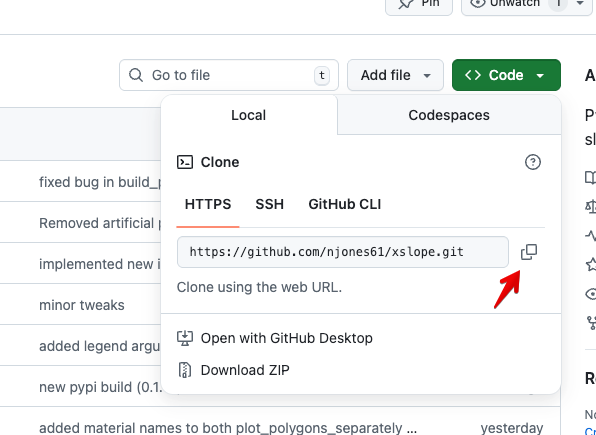
Then, in your terminal, navigate to the directory where you want to clone the repository and run the following command (you can either type the URL or paste it from the clipboard):
git clone https://github.com/njones61/xslope.git
You can also clone the repo directly into your IDE.